# Custom Fields
### Create Custom Fields
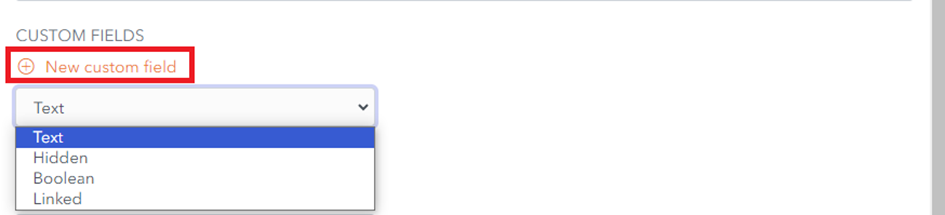
From the **Item Screen**, you can also add one or more Custom fields by choosing the field type from the dropdown menu and clicking on the **New Custom Field** button.
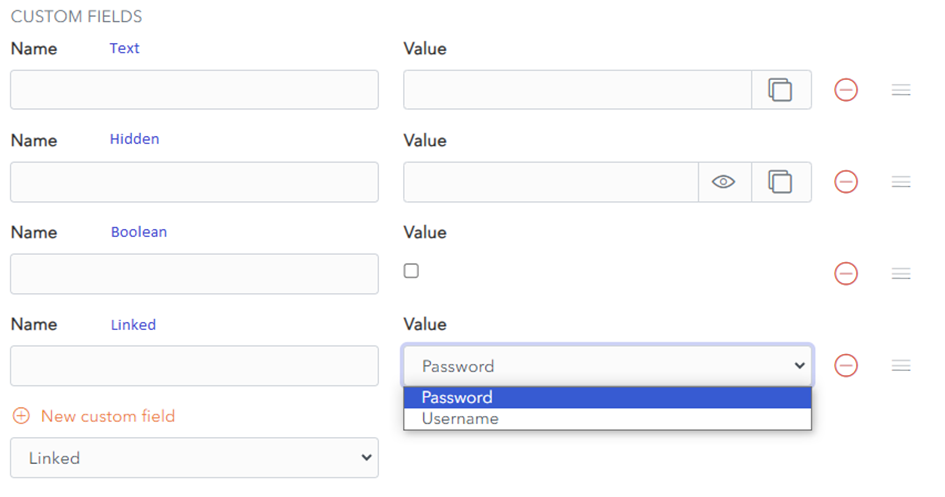
A Custom field has **Name** and **Value** properties. The Value field can be of type **Text, Boolean, Hidden or Linked.**
[](https://vault-doc.wallix.com/uploads/images/gallery/2023-11/embedded-image-vugano83.png)
- A **Text** custom field can hold a text value.
- A **Hidden** custom field can hold a hidden value and is typically used for passwords. This field can be displayed or hidden using the Display/Hide toggle button.
- A **Boolean** custom field can hold a true/false value and is typically used for yes/no choices.
- A **Linked** custom field can link to a Username or Password. Linked Fields are used for certain [**auto-fill options**](https://vault-doc.wallix.com/link/100).
[](https://vault-doc.wallix.com/uploads/images/gallery/2023-11/embedded-image-48ryrtds.png)
### Custom Field Names
The Naming of Custom Fields, that are linked to Login Fields for auto-fill purposes, should take into account the following rules.
#### Order of Preference
The 4 attributes of the HTML Form Element of the Linked Field take the following order of preference:
- id
- name
- aria-label
- placeholder
#### Matching
Custom Fields are **[matched ](https://vault-doc.wallix.com/link/101#bkmrk-%C2%A0-1)**based on **exact** and **case-insensitive comparison**, e.g. for the field mylogin
- Matched Names: MyLogin, myLogin
- Unmatched Names: mylogin2, login
#### Prefixing
Prefixes can be used to influence matching.
##### csv Prefix
To add multiple possible logins, use the prefix **csv=**.
For example, if a custom field is named csv=mylogin,MyLogin, myLogin, field name matching will work on mylogin or MyLogin or myLogin.
##### regex Prefix
To allow matching based on **[regular expressions](https://vault-doc.wallix.com/link/101#bkmrk-regular-expression)**, use the prefix **regex=**.
For example, regex=^myLogin will match on myLogin, or MyLogin.