# Encryption Key Settings
It is possible to change the Encryption Key Settings for your Account.
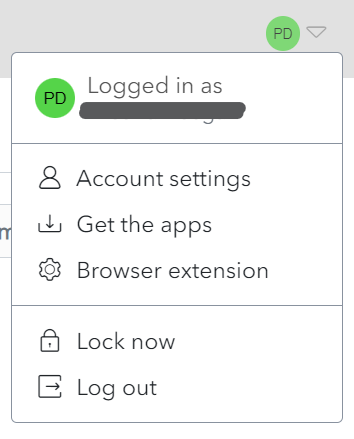
Click on the **User Icon,** on the top right-hand side of the screen, to display the **User Menu**.
[](https://vault-doc.wallix.com/uploads/images/gallery/2023-12/profile-menu-copie-2.png)
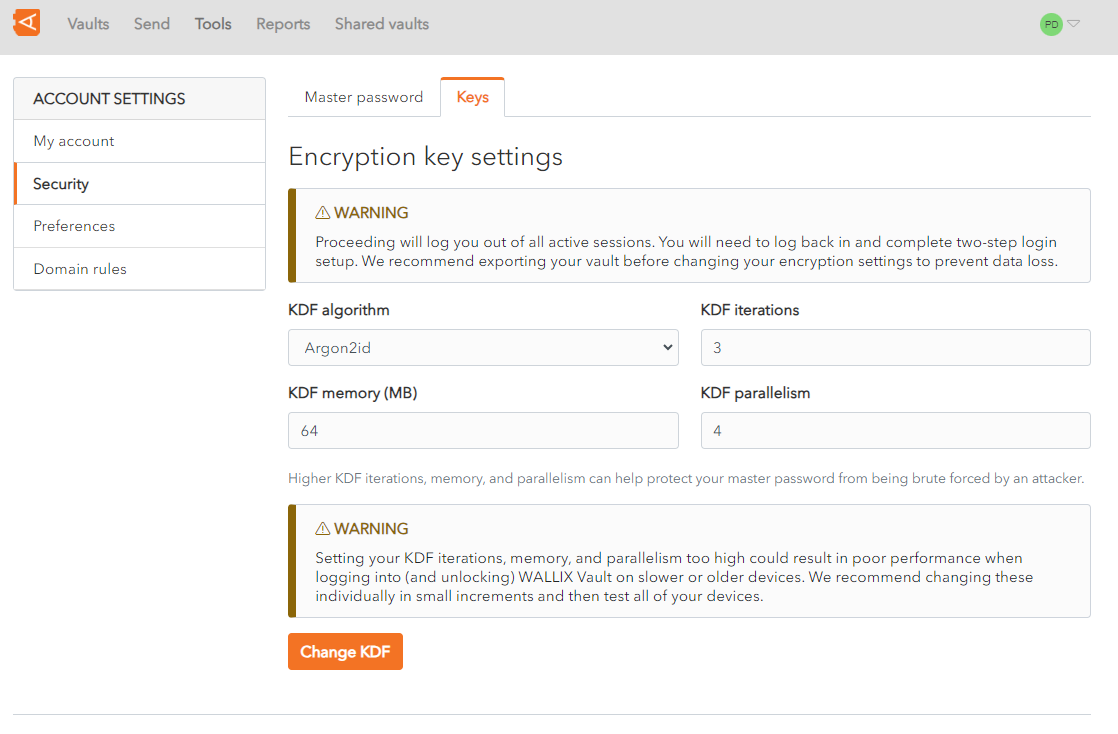
Click **Account Settings** and click **Security**. The Security screen is displayed on the Keys Tab.
[](https://vault-doc.wallix.com/uploads/images/gallery/2023-12/encryption-key-settings.png)
The following options can be changed:
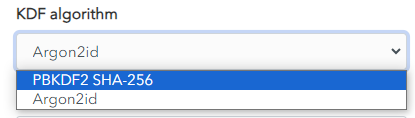
- **KDF algorithm**: There are 2 choices - **Argon2id** or **PBKDF2 SHA-256**.
To be more secure and efficient, use Argon2id rather than PBKDF2.
[](https://vault-doc.wallix.com/uploads/images/gallery/2023-12/capture-decran-2023-12-13-124713.png)
- **KDF Iterations**: Choose the number of iterations possible. The **default** is **3**.
- **KDF memory (MB)**: Choose the memory required . The **default** is **64**.
- **KDF parallelism**: Choose the parallism possible. The **default** is **4**
Higher KDF iterations, memory, and parallelism can help protect your master password from being brute forced by an attacker. However, setting your KDF iterations, memory, and parallelism too high could result in poor performance when logging into (and unlocking) WALLIX Vault on slower or older devices. Changing these parameters individually, in small increments, and then testing all your devices is the best way to ensure performance.
Proceeding will log you out of all active sessions. You will need to log back in and complete two-step login setup. Export your vault before modifying your encryption settings to avoid any loss of data.
Click **Change KDF** to change the Encryption Key Settings for your Account.