Search results are **sorted** based on a **scoring algorithm**, based on the **number** of **fields** that a **search term** appears in.
## Full-Text Search This is available in the **Web Vault** and **Browser Extension**. You can search on **the following indexed fields** in your items: - **shortid**: This is the **1st 8 characters** of the **Item** **ID** - **sharedvaultid:** This is the **Shared Vault ID**, for Items in a Shared Vault - **name**: Item **Name** - **subtitle**: This depends on the Item Type. It can be **Username**, **Login**, **Last 4 digits of Card Number**, **Card Brand** or **Identity Name**. - **notes**: **Notes** field of an Item. Matches on **full words only unless wildcards** are used. - **fields**: This is the **Name or Value** in Custom Fields. It is only available for **Custom Fields** of type **Text** - **attachments**: This is the **Name** of a File that is **attached** to an Item. - **login.username**: This is the **Username** of a **Login Item** - **login.uris**: This is the **URI Hostname** of a **Login Item** In this example, enter 21 in the **Search Field** to return all items where one of the fields being searched contains 21, in this case a **Card** item with 21 in the **last 4 digits of the card number**. 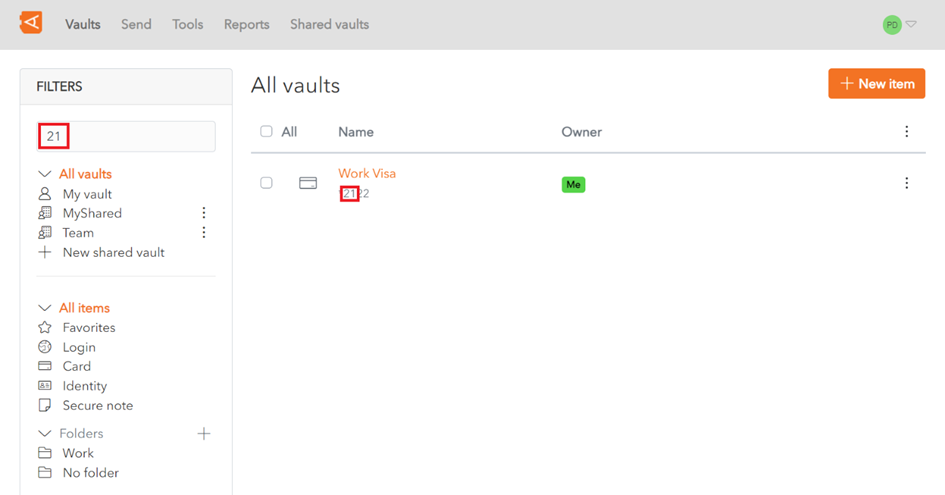Search results are **sorted** based on a **scoring algorithm**, based on the **number** of **fields** that a **search term** appears in.
**If no results** are **found** using a Full-Text Search, WALLIX Vault will use **Basic Search**.
#### Special Search Parameters Various wildcards and parameters can be used to make the search more specific: - [Leading and Trailing Wildcards ](https://vault-doc.wallix.com/link/21#bkmrk-leading-and-trailing) - Other Wildcards: - >fieldname searches only on that field name - >-fieldname searches on all fields except that field name - \* searches everything - >fieldname:search term searches for that search term in that fieldname - Search parameters available in **[Lunr js](https://lunrjs.com/guides/searching.html)**, like **Term Presence** or **Fuzzy Matching**. - + prefix indicates that what follows **must be contained** in the search results - - prefix indicates that what follows **must not be contained** in the search results - ~ prefix is used for **Fuzzy Matching**. #### Some examples include - >googl returns all items that **start with** googl - >name:Google will return all Items where **name equals** Google - >-name:Google will return all Items where **name does not equal** Google - >-login.username:\*@hotmail.com will return all Items where of type **Login** where the **Username starts with** @hotmail.com