This is a **Required field**. By **default**, a Send Lifespan is set at **7 days**.
#### Automatic Deletion of Sends When the Deletion Date is reached, the Send is **Marked for Deletion**. A **Delete icon** appears beside the Send for a few minutes **before** it is **permanently deleted**. [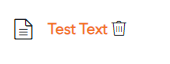](https://vault-doc.wallix.com/uploads/images/gallery/2023-11/mONimage.png)Deleted Items are **not stored** in the **Trash**. They are permanently removed from the Vault.
#### Manual Deletion of Sends From the **New Send Screen** or the **Edit Send Screen**, click the [](https://vault-doc.wallix.com/uploads/images/gallery/2023-11/UEKdelete-button.png)**Delete button**. The **Delete Send Confirmation Screen** appears. [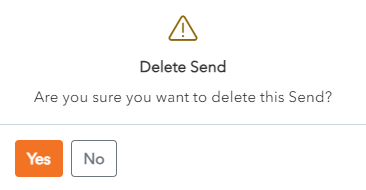](https://vault-doc.wallix.com/uploads/images/gallery/2023-11/delete-send-confirmation.png) Click **Yes** to delete the Send. Click **No** to cancel the operation. #### Access Deleted Send When a Recipient tries to access a **Deleted Send**, the following **Error Message** is displayed. [](https://vault-doc.wallix.com/uploads/images/gallery/2023-11/2XZsend-expired.png) ### Expiration Date A Send can be set to expire **a fixed period of time** after creation **or** on a **specific date**. #### Set Expiration Date Choose the **period of time** to **keep** the Send from the **Expiration Date** dropdown. The options range from 1 hour to 30 days. [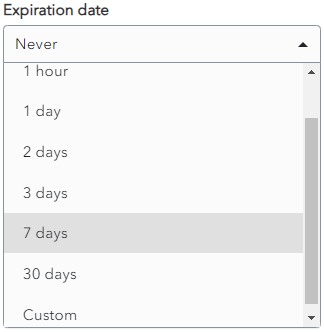](https://vault-doc.wallix.com/uploads/images/gallery/2023-11/dUfsend-expiration.png) Alternatively, choose **Custom**, then choose the **Expiration Date and Time**. [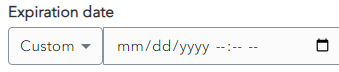](https://vault-doc.wallix.com/uploads/images/gallery/2023-11/3LCexpiration-date-custom.png)By **default**, a Expiraton Date is set at **Never**. Unless you specify an Expiration Date, your Send will never expire.
**Expired Sends** are **no longer accessible** to **Recipients** but they are still **accessible by** the **Sender until** their **Deletion Date.**
#### Access Expired Send Like for Deleted Sends, when a Recipient tries to access a **Expired Send**, the following **Error Message** is displayed. [](https://vault-doc.wallix.com/uploads/images/gallery/2023-11/2XZsend-expired.png) ### Maximum Access Count A **Send** can be set to have a Maximum Access Count. This means the **number of times** that it can be **accessed** by the Recipient **before** it becomes **unavailable**. #### Set Maximum Access Count Choose the **number of times** that the Recipient can **access the Send**. It can be left **blank**. [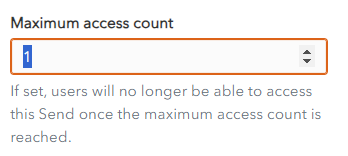](https://vault-doc.wallix.com/uploads/images/gallery/2023-11/maximum-access-count.png)By **default**, it is **blank**, which means the Send can be **accessed** an **unlimited** number of times before it is deleted.
A **Maximum Access Count Reached Icon** is **displayed** beside the **Send** in the Sender's Inbox. [](https://vault-doc.wallix.com/uploads/images/gallery/2023-11/max-access-count-reached.png) #### Access Send whose Maximum Access Count has been reached When a Recipient tries to access a **Send** whose **Maximum Access Count** has been **reached**, the following **Error Message** is displayed. [](https://vault-doc.wallix.com/uploads/images/gallery/2023-11/2XZsend-expired.png) ### Deactivate Send #### Deactivate a Send A send can be deactivated so that Recipients can no longer access it. **Check** the checkbox **Deactivate this Send so that no one can access it**. By **default**, this field is **unchecked.** [](https://vault-doc.wallix.com/uploads/images/gallery/2023-11/deactivate-send.png)**Deactivated** **Sends** are still **available** to the **Sender until** they are **deleted**.
A **Deactivated Icon** is **displayed** beside the **Send** in the Sender's Inbox. [](https://vault-doc.wallix.com/uploads/images/gallery/2023-11/deactivated-send.png) #### Access a Deactivated Send When a Recipient tries to access a **Deactivated Send**, the following **Error Message** is displayed. [](https://vault-doc.wallix.com/uploads/images/gallery/2023-11/2XZsend-expired.png)