A **URI** is **mandatory** for a Login Item in order to **auto-fill** it into a web page.
### URI Components A **URI** is made up for a number of **components**. https://www.google.com:8080/calendar/item?id=123&type=task - **Scheme** https:// - **Hostname** www.google.com - **Subdomain** www - **SLD (second level domain)** google - **TLD (top level domain)** com - **Port** 8080 - **Path** calendar/item - **Query** **String** ?id=123&type=task #### URI Scheme A URI Scheme **should be specified** as part of the **URI**. If it is not specified **http://** is used by **default**. However, if a Scheme is **not specified** by the user, the [ ](https://vault-doc.wallix.com/uploads/images/gallery/2023-12/launch.png)**Launch button,** to launch the website or app directly from the Vault, will **not work**. [](https://vault-doc.wallix.com/uploads/images/gallery/2023-12/add-uri-copie.png) **Examples** of schemes are - https:// or http:// are schemes that reference web pages, e.g. https://www.google.com - androidapp::// is a scheme that references an Android app pacakge ID or name, e.g. androidapp://com.google.android ### Mobile App URIs **Every mobile app** has it's **own URI**. In order to save the login of an app into the Vault, it is necessary to **save the URI** of the app. #### Locate App URI for iOS From the App Login Screen on your iOS device, **open the Browser Extension.** Click the **+ button** to create a new Item in the Browser Extension. The **New Item Screen** displays and it is **prepopulated** with the **URI** of the **App**.This **only works if** the **App permits** recuperating the URI.
The Item can be **saved** as a **Login Item** for this Mobile App. Alternatively, the **URI** can be **copied** and **pasted** into another Login Item. #### Locate App URI for Android From the **App page** in the **Google Play Store**, locate the **Share** button. Copy the **Share Button link** to the clipboard. **Paste** the link to an email or another file where it can be displayed. The **link** will look something like this: https://play.google.com/store/apps/details?id=com.twitter.android The **URI** is the **id value**, in this example, com.twitter.android ### URI Match Detection **Each URI** associated with an Item in WALLIX Enterprise Vault has a number Match detection options in the that **Match detection dropdown** can be chosen. The Match detection option chosen tells WALLIX **how to match the URI** of the **Vault Item** with the **URI** of the **web page or mobile app** for **auto-filling**. [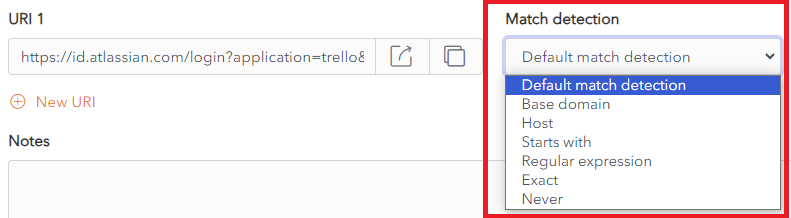](https://vault-doc.wallix.com/uploads/images/gallery/2023-12/wxVmatch-detection.png) #### Defaut match detection **Base domain** is the **default** option for **URI match detection.** However, this can be **changed** in **Settings > Auto-fill** for **all Items.** The Default match detection can be **specified** on a per item basis, in the Item Screen for **each item**. If not specified, the default option is used. #### Base domain If **Base domain** is chosen as the Default match detection for a URI, WALLIX will try to auto-fill all pages or apps where the **top-level domain (TLD) or second-level domain (SLD)** of the Page URI matches a the top-level domain or second-level domain of a Vault Item.This works with **country code top level domains** only. Local TLDs, e.g. **www.google.local** do not work. **Local TLDs** work with **Host matching**.
For example, https://google.com Auto-fill works: - www.google.com - calendar.google.fr Auto-fill does not work: - www.google.net #### Host If **Host** is chosen as the Default match detection for a URI, WALLIX will try to auto-fill all pages or apps where the **hostname** (**and port**, if specified) of the Page URI matches a the hostname (and port, if specified) of a Vault Item. For example, https://calendar.google.com:8080 Auto-fill works: - calendar.google.com:8080 - calendar.google.com:8080/home.html Auto-fill does not work: - www.google.com (different subdomain and missing port) - www.google.com:8080 (different subdomain) - calendar.google.com:8081 (different port) #### Starts with If **Starts with** is chosen as the Default match detection for a URI, WALLIX will try to auto-fill all pages or apps where the Page URI **starts with** the URI of a Vault Item. For example, https://www.google.com/home/ Auto-fill works: - https://www.google.com/home/index.html - https://www.google.com/home/ Auto-fill does not work: - https://www.google.com - https://www.google.com:8080/home/ (port number added) - https://www.google.com/home (missing trailing slash) #### Regular expression If **Starts with** is chosen as the Default match detection for a URI, WALLIX will try to auto-fill all pages or apps where the Page URI matches a **specified regular expression** associated with the URI of a Vault Item.Regular expressions are **case insensitive**.
For example, ^https://\[a-z\]+\\.google\\.com/index\\.php Auto-fill works: - https://www.google.com/index.php - https://fr.google.com/index.php Auto-fill does not work: - https://www.google.com/index/ (missing .php) - https://malicious-site.com?q=google.com For example, ^https://.\*google\\.com$ Auto-fill works: - https://www.google.com - https://fr.google.com/index.html - **https://malicious-site.com?q=google.com**URI matching with Regular Expressions is an **advanced** option and should **only** be used **by those familiar** with using **[Regular Expressions](https://en.wikipedia.org/wiki/Regular_expression#Standards).**
**Periods (.)** must be **escaped (\\)** otherwise they will match on any character.
Auto-fill does not work: - https://google.com/index/ (missing period (.)) #### Exact If **Exact** is chosen as the Default match detection for a URI, WALLIX will try to auto-fill all pages or apps where the Page **URI** is an **exact match** for the URI of a Vault Item. For example, https://calendar.google.com/index.html Auto-fill works: - https://calendar.google.com/index.html Auto-fill does not work: - https://calendar.google.com/index.htm (index.htm instead of index.html) - http://calendar.google.com/index.html (http instead of https) - https://www.google.com/index.html (different subdomain)For **HTTPS**, even if Exact matching is not used, the Browser Extension will **warn before** auto-filling a **HTTP** site **if HTTPS** is **expected**.
#### Never If **Never** is chosen as the Default match detection for a URI, WALLIX will **never** try to **auto-fill** all pages or apps using **that Vault Item.** ### Equivalent Domains It is possible to link equivalent domains, or domains that use the same login. For example, calendar.google.com can be linked with www.google.com. This can be done in **Settings > Domain Rules**.If **Exact match detection** is used an **equivalent domain** will **not** be **allowed**.